


08-09-2025, 10:43 AM
Thanks to Graham72 for making aware of the presence of NZCom (Z-System for CP/M 2.2) and for configuring it to run on the Microbee.
NZ-Com is an automatic Z-System for CP/M 2.2 and written by Joe Wright.
NZ-Com is a major enhancement of the standard CP/M 2.2 operating system. It gives you completely new software for processing commands that is functionally the same as the widely popular ZCPR3 system or Z-System for CP/M 2.2 computers. At the same time, NZ-Com retains the lower-level software (the BIOS and BDOS) of CP/M, allowing you to continue to take advantage of the best features of your current system.
The central function of the NZ-Com system is to enhance the control and processing of the commands that direct the CP/M system. It provides :-
• convenient editing of mistyped commands
• recall of previous commands for re-use, correction, or modification
• conditional execution of a sequence of commands, where execution can depend on:
– the success/failure of programs previously executed
– the availability and characteristics of necessary files
– the user’s privileges and other system characteristics
– run-time input from the user
• named directories to conveniently segregate files and optionally protect directories with passwords
• command aliases, single commands that cause an entire command script to execute automatically
• a standardized method of using a terminal’s full-screen capabilities, available to all applications wishing to use them
• a programming and user environment that fosters innovation and cooperation
• portability of programs among a wide variety of Z80-compatible computers
This is an update to CP/M 2.2 and the 2 versions we have are intended for any Microbee disk based system. Two disk versions are available, DS40 (5.25") and the DS80 (3.5"). Both disks autoboots NZ-Com with its Terminal setup for the Microbee. The traditional directory program L.COM is also there, but DIR or just D will also give the disk Directory. EXIT will exit NZ-Com and jump you back to CP/M.
Read the RELEASE.NOT file for the latest and previous updates to the program.
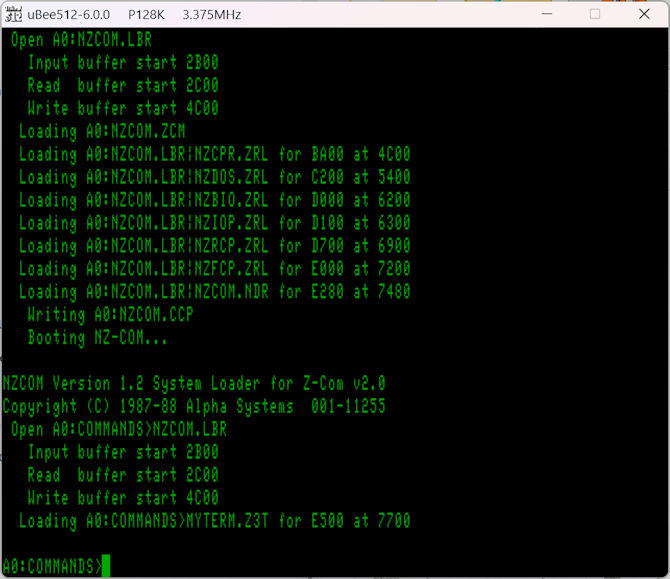
For any further discussion, see https://microbeetechnology.com.au/forum/thread-827.html
So in the MbeeTech Repository in the Microbee\Software\System_Disks folder we placed
nzcom_v1.2h_ds40.dsk
nzcom_v1.2h_ds80.dsk
nzcom_users_manual.pdf <-- in the Documentation/Manuals/Software folder
NZ-Com is an automatic Z-System for CP/M 2.2 and written by Joe Wright.
NZ-Com is a major enhancement of the standard CP/M 2.2 operating system. It gives you completely new software for processing commands that is functionally the same as the widely popular ZCPR3 system or Z-System for CP/M 2.2 computers. At the same time, NZ-Com retains the lower-level software (the BIOS and BDOS) of CP/M, allowing you to continue to take advantage of the best features of your current system.
The central function of the NZ-Com system is to enhance the control and processing of the commands that direct the CP/M system. It provides :-
• convenient editing of mistyped commands
• recall of previous commands for re-use, correction, or modification
• conditional execution of a sequence of commands, where execution can depend on:
– the success/failure of programs previously executed
– the availability and characteristics of necessary files
– the user’s privileges and other system characteristics
– run-time input from the user
• named directories to conveniently segregate files and optionally protect directories with passwords
• command aliases, single commands that cause an entire command script to execute automatically
• a standardized method of using a terminal’s full-screen capabilities, available to all applications wishing to use them
• a programming and user environment that fosters innovation and cooperation
• portability of programs among a wide variety of Z80-compatible computers
This is an update to CP/M 2.2 and the 2 versions we have are intended for any Microbee disk based system. Two disk versions are available, DS40 (5.25") and the DS80 (3.5"). Both disks autoboots NZ-Com with its Terminal setup for the Microbee. The traditional directory program L.COM is also there, but DIR or just D will also give the disk Directory. EXIT will exit NZ-Com and jump you back to CP/M.
Read the RELEASE.NOT file for the latest and previous updates to the program.
For any further discussion, see https://microbeetechnology.com.au/forum/thread-827.html
So in the MbeeTech Repository in the Microbee\Software\System_Disks folder we placed
nzcom_v1.2h_ds40.dsk
nzcom_v1.2h_ds80.dsk
nzcom_users_manual.pdf <-- in the Documentation/Manuals/Software folder
---------------------------
ChickenMan
ChickenMan