


13-06-2026, 11:59 AM
Thanks to Graham72 for making all these utilities available. All run in a PC Browser to view, extract, list, open, etc BASIC MWB files in the MBUG Disk collection, as well as others.
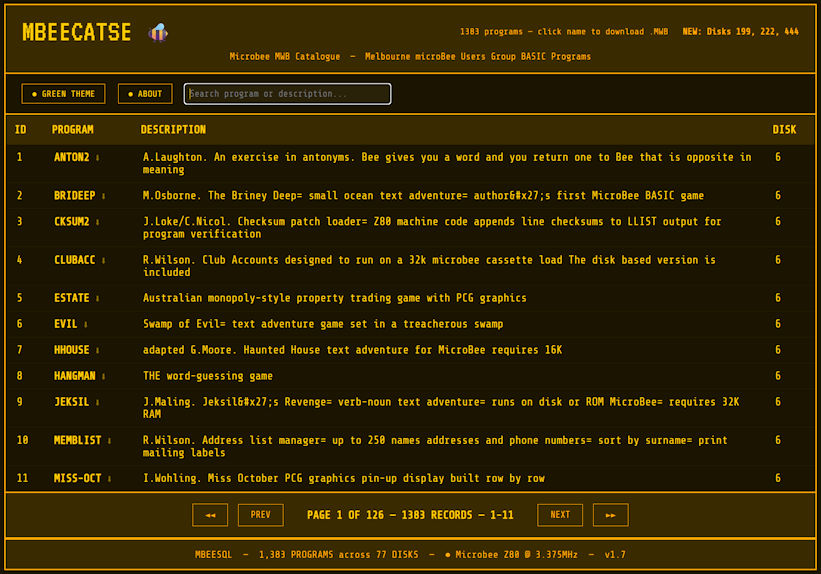
MBEECATSE
This is the original MBEECAT (see ***MBEECAT.HTML*** — From Concept to Catalogue) but updated to now include the BEEHIVE BBS section of the Walnut Creek CP/M CD-ROM and the collection of MWB files from Ftp.omen.com.au.
BEEVIEW
It manages the Microbee software catalog and views tokenised .mwb programs. Click OPEN FOLDER to select the folder containing your I.js and MBEECATSE.html files — the catalog loads automatically. To view a program, select an entry and click ▶ SHOW PROGRAM — the .mwb file is extracted from the embedded ZIP and detokenised into a BASIC listing. Click LOAD .MWB to view any .mwb file directly from you HD.
MBUGDISKS
Is a single-file, browser-based catalogue and viewer for the complete non-BASIC software library of the Melbourne MicroBee Users Group (MBUG). It indexes 3,940 files across 184 CP/M-formatted floppy discs distributed by MBUG in mid 1980s to the early 1990s. An extensive User Manual PDF is also provided. It now handles better the files in Crunch, LZH & ARC form.
SCANNER
Lists all the LBR/LQR/ARC/ARK files within the MBUG disk collection and their contents.
All the above are in the one ZIP file, just copy the contents, including the new I.JS file, to the same folder that you initially setup for MBEECAT over writing the *.JS files.
So in the MbeeTech Repository in the Microbee\Software\Applications folder we placed
MBEECATSE+OTHERS.zip
a.js <--- zip file includes all these files
b.js
BEEVIEW.html
I.js
MBEECATSE.html
MBUGDISKS1.1F.HTML
MBUGDISKSv1.1F.pdf
SCANNER.HTML
MBEECATSE
This is the original MBEECAT (see ***MBEECAT.HTML*** — From Concept to Catalogue) but updated to now include the BEEHIVE BBS section of the Walnut Creek CP/M CD-ROM and the collection of MWB files from Ftp.omen.com.au.
BEEVIEW
It manages the Microbee software catalog and views tokenised .mwb programs. Click OPEN FOLDER to select the folder containing your I.js and MBEECATSE.html files — the catalog loads automatically. To view a program, select an entry and click ▶ SHOW PROGRAM — the .mwb file is extracted from the embedded ZIP and detokenised into a BASIC listing. Click LOAD .MWB to view any .mwb file directly from you HD.
MBUGDISKS
Is a single-file, browser-based catalogue and viewer for the complete non-BASIC software library of the Melbourne MicroBee Users Group (MBUG). It indexes 3,940 files across 184 CP/M-formatted floppy discs distributed by MBUG in mid 1980s to the early 1990s. An extensive User Manual PDF is also provided. It now handles better the files in Crunch, LZH & ARC form.
SCANNER
Lists all the LBR/LQR/ARC/ARK files within the MBUG disk collection and their contents.
All the above are in the one ZIP file, just copy the contents, including the new I.JS file, to the same folder that you initially setup for MBEECAT over writing the *.JS files.
So in the MbeeTech Repository in the Microbee\Software\Applications folder we placed
MBEECATSE+OTHERS.zip
a.js <--- zip file includes all these files
b.js
BEEVIEW.html
I.js
MBEECATSE.html
MBUGDISKS1.1F.HTML
MBUGDISKSv1.1F.pdf
SCANNER.HTML
---------------------------
ChickenMan
ChickenMan