


26-11-2021, 06:17 PM
Checking through my disk collection looking for something else, I found an original Microbee Dreamdisk Master 5.25" floppy, which I had forgotten I had. So then set about to image it.
After multiple tries on different hardware and using both 40 and 80 track drives, the best I could get was an image with errors in Track 0 and a couple of other smaller errors in the later 1/2 of the disk. It was a standard Microbee double sided 40 track disk. So with track 0 damaged, the image was not able to boot but I was still able to get a directory listing when in a B: drive. The image contained SYSGEN and ZCPR56.SYS so was able to put a clean copy of the system track back onto the image using these 2 files and it now boots Boots to -
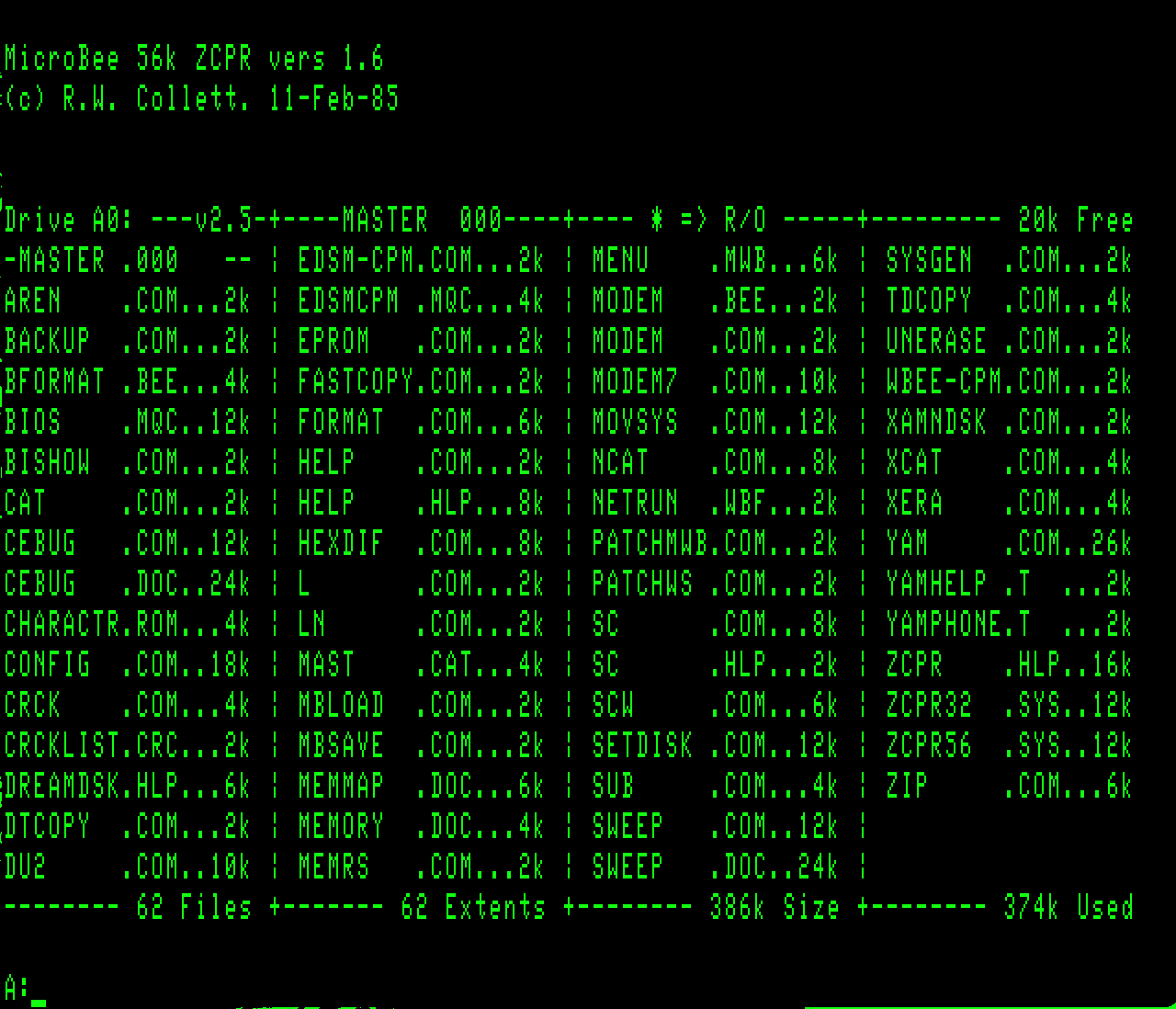
There were a couple of other errors on the disk so all files were checked and a couple files (ZIP & SWEEP) were replaced with working copies off another Dreamdisk disk. Also included on the disk was the Dreamdisk BIOS source code that un-squeezes fine to another drive, as the disk is almost full. The disk also contains lots of other utilities not included on other Dreamdisk images that we have in the Repository, see pic above.
To boot it using ubee512 emulator, just use
ubee512 dd -a dreamdisk_56k_master_11feb85_ds40.dsk
So in the MbeeTech Repository in the Microbee/Software/System_Disks/Systems folder we placed
dreamdisk_56k_master_11feb85_ds40.dsk <--- These 2 files in the one ZIP file
dreamdisk_bios_84_12.mac
dreamdisk_master.jpg <-- in Documentation/Pictures/Disks folder
After multiple tries on different hardware and using both 40 and 80 track drives, the best I could get was an image with errors in Track 0 and a couple of other smaller errors in the later 1/2 of the disk. It was a standard Microbee double sided 40 track disk. So with track 0 damaged, the image was not able to boot but I was still able to get a directory listing when in a B: drive. The image contained SYSGEN and ZCPR56.SYS so was able to put a clean copy of the system track back onto the image using these 2 files and it now boots
Boots to -There were a couple of other errors on the disk so all files were checked and a couple files (ZIP & SWEEP) were replaced with working copies off another Dreamdisk disk. Also included on the disk was the Dreamdisk BIOS source code that un-squeezes fine to another drive, as the disk is almost full. The disk also contains lots of other utilities not included on other Dreamdisk images that we have in the Repository, see pic above.
To boot it using ubee512 emulator, just use
ubee512 dd -a dreamdisk_56k_master_11feb85_ds40.dsk
So in the MbeeTech Repository in the Microbee/Software/System_Disks/Systems folder we placed
dreamdisk_56k_master_11feb85_ds40.dsk <--- These 2 files in the one ZIP file
dreamdisk_bios_84_12.mac
dreamdisk_master.jpg <-- in Documentation/Pictures/Disks folder
---------------------------
ChickenMan
ChickenMan