


05-05-2024, 10:54 AM
Thanks to MbeeTech for making this file available. Found recently on a 5.25" Microbee DS40 disk that imaged 100% error free.
Composer Bee II was written by Wayne Grant and released by Mytek Computing in 1983. He also produced Composer Bee+ which was released by MicroBee Systems in 1985, which we have in the repository. We already have the Mytek manual for Composer Bee II in the Repository also, so check it for further info on its operation and capabilities. From the Manual -
COMPOSER BEE II is a excellent aid in
learning Music Theory. Write your own
melody on the screen staff and listen to the
result. You may now transpose, add to or
modify your tune. The notes on the staffs will
change accordingly and you may again listen
to the result.
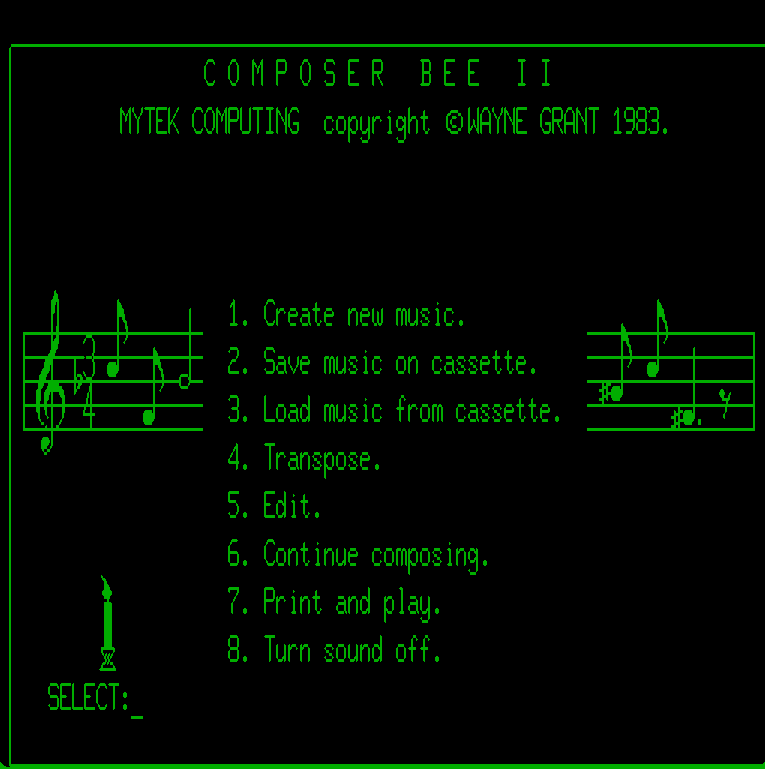
The program boots to a menu where you can select an option, just hit a key between 1 and 8. After selecting an option, the ESC key can be used to return back to the main menu. However, since this appears to have originated from a tape, you can only save and retrieve your files from a cassette tape. The Microbee Composer Bee+ version appears to have the same options but saves and retrieves your files from disk. You can also use DTCOPY to convert it back to a tape file if needed.
So in the MbeeTech Repository in the Microbee\Software\Applications\Music_speech folder we placed
composer_bee_II_ds40.dsk
Composer Bee II was written by Wayne Grant and released by Mytek Computing in 1983. He also produced Composer Bee+ which was released by MicroBee Systems in 1985, which we have in the repository. We already have the Mytek manual for Composer Bee II in the Repository also, so check it for further info on its operation and capabilities. From the Manual -
COMPOSER BEE II is a excellent aid in
learning Music Theory. Write your own
melody on the screen staff and listen to the
result. You may now transpose, add to or
modify your tune. The notes on the staffs will
change accordingly and you may again listen
to the result.
The program boots to a menu where you can select an option, just hit a key between 1 and 8. After selecting an option, the ESC key can be used to return back to the main menu. However, since this appears to have originated from a tape, you can only save and retrieve your files from a cassette tape. The Microbee Composer Bee+ version appears to have the same options but saves and retrieves your files from disk. You can also use DTCOPY to convert it back to a tape file if needed.
So in the MbeeTech Repository in the Microbee\Software\Applications\Music_speech folder we placed
composer_bee_II_ds40.dsk
---------------------------
ChickenMan
ChickenMan