


27-03-2026, 04:08 PM
Hi All.
USB mouse is now working.
I did the bulk of this work in the week before the Model Train and Hobby exhibition a couple of weeks ago, but didn't quite get it working
in time for display then.
At that point I had confirmed that the hardware was working and had mouse packets being delivered etc. To get the mouse working with
Microbee Software though, I had to do some work on the Microbee CP/M Extended BIOS calls (Calls #20 Set_mouse & #21 Get_Mouse).
The updates I've done prioritise the USB mouse, so if one is connected mouse packets come from that, but if there is not one connected the
BIOS still checks for an external serial mouse (on the serial port with the mouse adapter).
I decided to spend a couple of hours on it today in between other things & found 1 bug in the BIOS updates. Easy mistake under pressure
to get it done : ld a,(usbm_st) was written instead of in a,(usbm_st) to read the mouse status port to check wither a packet is available.
It turns out that the Shell, Init & Transfer all have their own mouse routines instead of using the XBIOS calls, so at the moment, the mouse
doesn't show up when in the Shell or Init or Transfer. I'll update them to either use the XBIOS calls or have the routines updated with the same
changes I've put into the XBIOS.
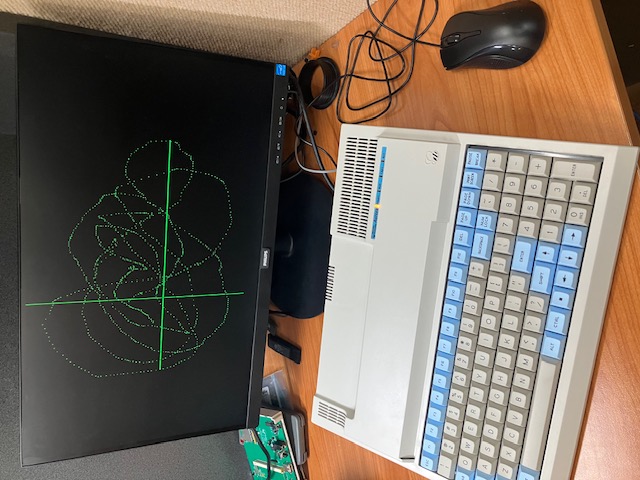
In the meantime though, the XBIOS calls have been tested with a small program that came out with the Mouse Programmers Guide and BIOS v9
release which sets up the screen with a cross-hair cursor & allows you to set dots on the screen by pressing the left button. Right button
click exits the program back to CP/M or the Shell:
USB mouse is now working.
I did the bulk of this work in the week before the Model Train and Hobby exhibition a couple of weeks ago, but didn't quite get it working
in time for display then.
At that point I had confirmed that the hardware was working and had mouse packets being delivered etc. To get the mouse working with
Microbee Software though, I had to do some work on the Microbee CP/M Extended BIOS calls (Calls #20 Set_mouse & #21 Get_Mouse).
The updates I've done prioritise the USB mouse, so if one is connected mouse packets come from that, but if there is not one connected the
BIOS still checks for an external serial mouse (on the serial port with the mouse adapter).
I decided to spend a couple of hours on it today in between other things & found 1 bug in the BIOS updates. Easy mistake under pressure
to get it done : ld a,(usbm_st) was written instead of in a,(usbm_st) to read the mouse status port to check wither a packet is available.
It turns out that the Shell, Init & Transfer all have their own mouse routines instead of using the XBIOS calls, so at the moment, the mouse
doesn't show up when in the Shell or Init or Transfer. I'll update them to either use the XBIOS calls or have the routines updated with the same
changes I've put into the XBIOS.
In the meantime though, the XBIOS calls have been tested with a small program that came out with the Mouse Programmers Guide and BIOS v9
release which sets up the screen with a cross-hair cursor & allows you to set dots on the screen by pressing the left button. Right button
click exits the program back to CP/M or the Shell: